
@Self, @SkipSelf, @Optional & @Host are Angular Decorators that configure how the DI Framework should resolve the dependencies. These decorators are called Resolution Modifiers because they modify the behavior of injectors. In this tutorial, we will learn @Self, @SkipSelf, & @Optional. We will look at the @Host in the next tutorial
When a component asks for Dependency, the DI Framework resolves it in two phases.
In the first phase, it starts to look for the Dependency in the current component’s ElementInjector. If it does not provide the Dependency, it will look in the Parent Components ElementInjector. The Request bubbles up until it finds an injector that provides the service or reaches the root ElementInjector.
If ElementInjector does not satisfy the request, Angular looks for the Dependency in the ModuleInjector hierarchy. If Angular still doesn’t find the provider, it throws an error.
The older versions of the Angular created only one Injector tree. But
in the later versions, the tree was split into two trees. One is ElementInjector for
elements (components, directives & pipes etc) and the other one is ModuleInjector for Angular Modules.
We have created an example project in Angular to explain the @Self, @SkipSelf, & @Optional. You can find the Source Code in StackBlitz.
The Code contains a RandomService, which generates a Random Number when
initialized. The Angular Service is added
to the Providers array of the AppModule. We can inject this service anywhere in our Application.
@Injectable({
  providedIn: "root"
})
export class RandomService {
The project contains three Angular Components (AppComponent, ChildComponent & GrandChildComponent) all inject the RandomService and displays the Random Number from the Service.
We also have testDirective, which we include in the template of
GrandChildComponent. It also displays the Random Number from the Service.
Ensure that the Providers array is empty in all components & directives. Run the App. Angular creates only one instance of the RandomService. That is why all the components and directives show the same number.
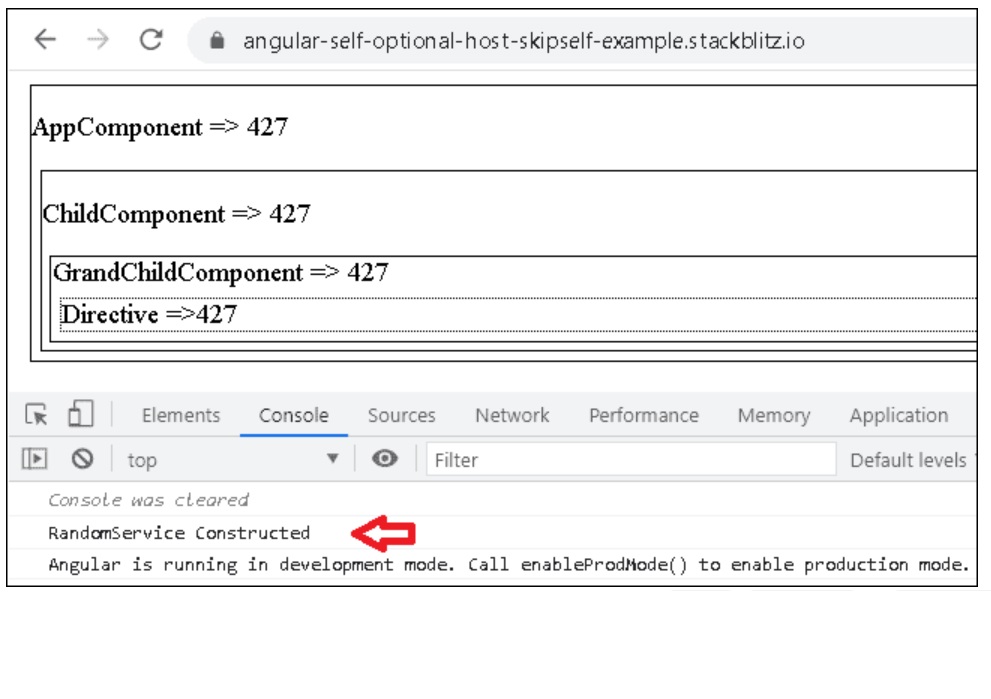
Now, let us check how we can modify the above behavior with @Self, @SkipSelf, & @Optional
First let us start with @Self
The @Self decorator instructs Angular to look for the dependency only in the local injector. The local injector is the injector that is part of the current component or directive.
Open the GrandChildComponent and add the @Self() on
randomService as shown below.
@Component({
  selector: "my-grandChild",
  template: `
    <div class="box">
      GrandChildComponent => {{ randomNo }}
      <div class="dirbox" testDirective>fdf</div>
    </div>
  `,
  providers: []
})
export class GrandChildComponent {
  randomNo;
  constructor(@Self,() private randomService: RandomService) {
    this.randomNo = randomService.RandomNo;
  }
}
This forces the Angular DI Framework to look for the Dependency attached to the current Component. Since it does find one it will throw the error
Error: NG0201: No provider for RandomService found in NodeInjector
Add the RandomService to the providers array of the GrandChildComponent and the error goes away.
@Component({
  selector: "my-grandChild",
  template: `
    <div class="box">
      GrandChildComponent => {{ randomNo }}
      <div class="dirbox" testDirective>fdf</div>
    </div>
  `,
  providers: [RandomService]
})
export class GrandChildComponent {
  randomNo;
  constructor(@Self,() private randomService: RandomService) {
    this.randomNo = randomService.RandomNo;
  }
}
As you can see from the image Angular creates two instances of RandomService. One from the AppModule and another from the GrandChildComponent. Also, note that testDirective picks up the RandomService provided from the GrandChildComponent and not from the AppModule
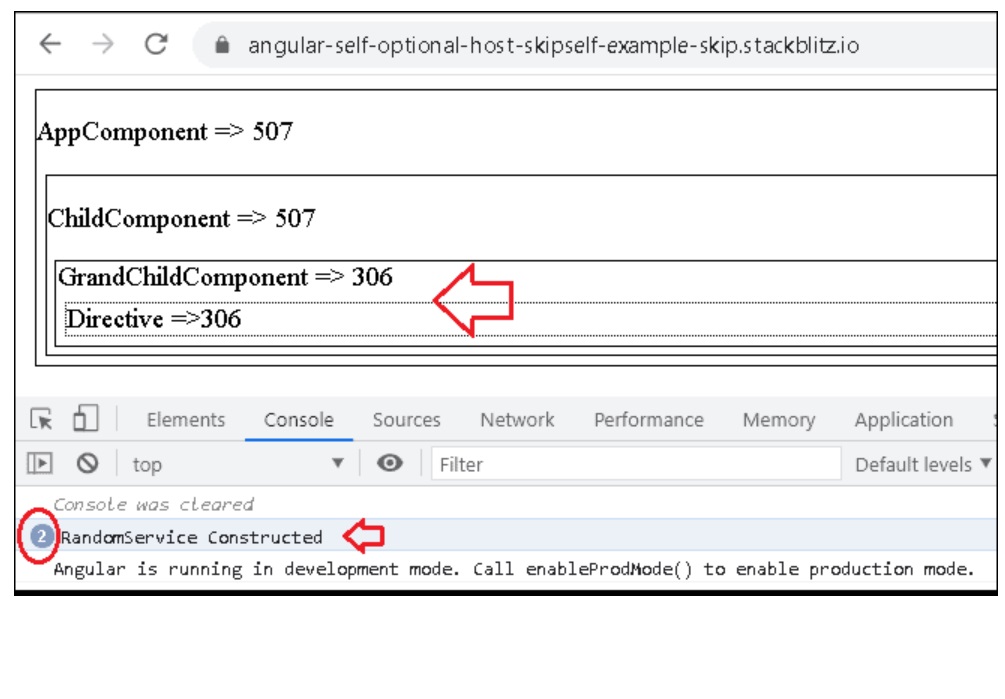
The @SkipSelf decorator instructs Angular to look for the dependency in the Parent Injector and upwards.
It tells Angular not to look for the injector in the local injector, but start from the Parent. You can think of this decorator as the opposite of the @Self
Open the GrandChildComponent again. Add the SkipSelf instead
of Self
decorator.
import { Component, SkipSelf, Self, Optional, Host } from "@angular/core";
import { RandomService } from "./random-service";

@Component({
  selector: "my-grandChild",
  template: `
    <div class="box">
      GrandChildComponent => {{ randomNo }}
      <div class="dirbox" testDirective>fdf</div>
    </div>
  `,
  providers: [RandomService]
})
export class GrandChildComponent {
  randomNo;
  constructor(@SkipSelf,() private randomService: RandomService) {
    this.randomNo = randomService.RandomNo;
  }
}
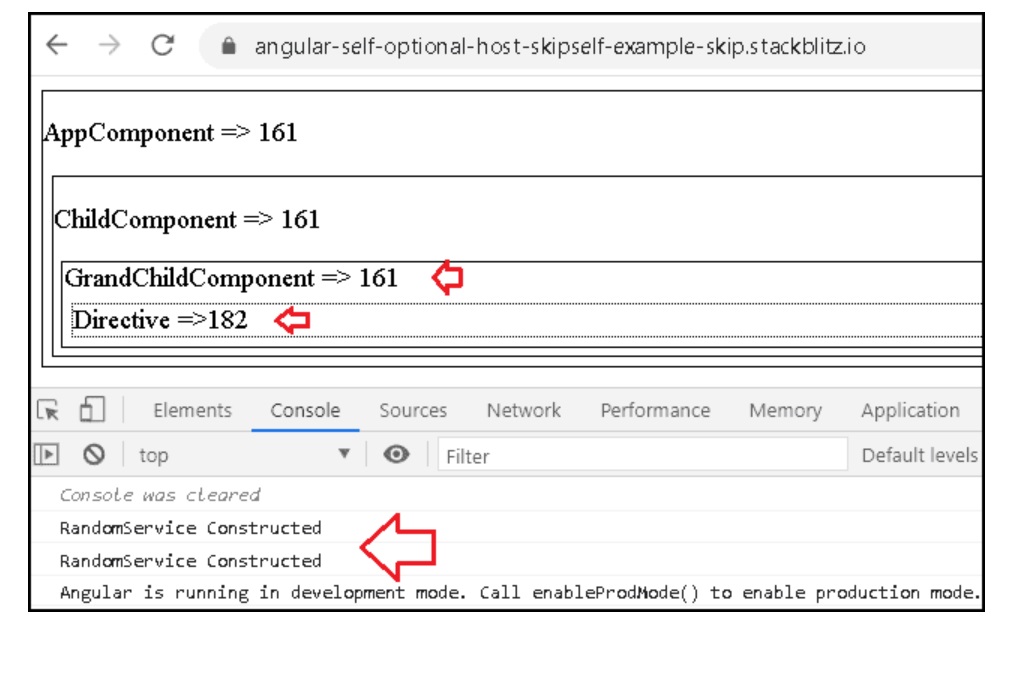
As you can see from the image, the GrandChildComponent, picks
up RandomService instance provided by the Module and not the one provided by itself.
But, the testDirective still picks up the RandomService
provided by the
GrandChildComponent.
Optional marks the dependency as Optional. If the dependency is not found,
then it returns null instead of throwing an error
In the GrandChildComponent remove the RandomService from the Providers
Array and add the @Self decorator. You will instantly receive the error “No provider for
RandomService found in NodeInjector“ .
Add the @Optional decorator along with the @Self. Now, the
dependency injection will return null instead of an error.
Also, remember to add the ? in randomService?, else you will get the
“Cannot
read property ‘RandomNo’ of null” error.
import { Component, SkipSelf, Self, Optional, Host } from "@angular/core";
import { RandomService } from "./random-service";

@Component({
  selector: "my-grandChild",
  template: `
    <div class="box">
      GrandChildComponent => {{ randomNo }}
      <div class="dirbox" testDirective>fdf</div>
    </div>
  `,
  providers: []
})
export class GrandChildComponent {
  randomNo;
  constructor(@Optional,() @Self,() private randomService: RandomService) {
    this.randomNo = randomService?.RandomNo;
  }
}
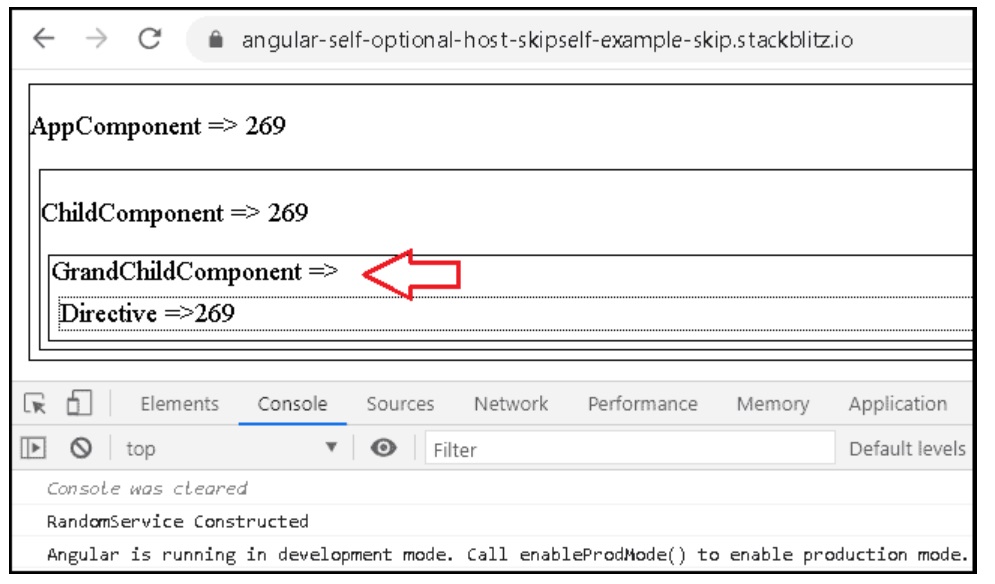
As you can see in the image, GrandChildComponent does not receive any
values, while testDirective picks up the RandomService provided by the
AppModule
import { Component, VERSION } from "@angular/core";
import { RandomService } from "./random-service";

@Component({
  selector: "my-app",
  providers: [],
  viewProviders: [],
  template: `
    <div class="box">
      <p>AppComponent => {{ randomNo }}</p>
      <my-child></my-child>
    </div>
  `
})
export class AppComponent {
  randomNo;
  constructor(private randomService: RandomService) {
    this.randomNo = randomService.RandomNo;
  }
}
import { Component, SkipSelf, Self, Optional, Host } from "@angular/core";
import { RandomService } from "./random-service";

@Component({
  selector: "my-child",
  providers: [],
  viewProviders: [],
  template: `
    <div class="box">
      <p>ChildComponent => {{ randomNo }}</p>

      <my-grandChild></my-grandChild>
    </div>
  `
})
export class ChildComponent {
  randomNo;
  constructor(private randomService: RandomService) {
    this.randomNo = randomService.RandomNo;
  }
}
import { Component, SkipSelf, Self, Optional, Host } from "@angular/core";
import { RandomService } from "./random-service";

@Component({
  selector: "my-grandChild",
  template: `
    <div class="box">
      GrandChildComponent => {{ randomNo }}
      <div class="dirbox" testDirective>fdf</div>
    </div>
  `,
  providers: []
})
export class GrandChildComponent {
  randomNo;
  constructor(private randomService: RandomService) {
    this.randomNo = randomService.RandomNo;
  }
}
import {
  Directive,
  ElementRef,
  Input,
  OnInit,
  SkipSelf,
  Self,
  Optional,
  Host
} from "@angular/core";
import { RandomService } from "./random-service";

@Directive({
  selector: "[testDirective]",
  providers: []
})
export class testDirective implements OnInit {
  @Input,() ttClass: string;

  constructor(private el: ElementRef, private randomService: RandomService) {}

  ngOnInit() {
    this.el.nativeElement.innerHTML =
      "Directive =>" + this.randomService.RandomNo;
  }
}
import { Injectable } from "@angular/core";

@Injectable({
  providedIn: "root"
})
export class RandomService {
  private _randomNo = 0;

  constructor() {
    console.log("RandomService Constructed");
    this._randomNo = Math.floor(Math.random() * 1000 + 1);
  }

  get RandomNo() {
    return this._randomNo;
  }
}
.box {
  margin: 5px;
  border: 1px;
  border-style: solid;
}

.dirbox {
  margin: 5px;
  border: 1px;
  border-style: dotted;
}
import { NgModule } from "@angular/core";
import { BrowserModule } from "@angular/platform-browser";
import { FormsModule } from "@angular/forms";

import { AppComponent } from "./app.component";
import { ChildComponent } from "./child.component";
import { GrandChildComponent } from "./grand-child.component";
import { testDirective } from "./test-directive";

@NgModule({
  imports: [BrowserModule, FormsModule],
  declarations: [
    AppComponent,
    ChildComponent,
    GrandChildComponent,
    testDirective
  ],
  bootstrap: [AppComponent]
})
export class AppModule {}
